Turn Viral Tweets into Narrated Shorts with AI
Convert viral tweets and X threads into engaging, narrated short-form videos for TikTok, Reels, and YouTube Shorts using AI tools.
Turning viral tweets and X threads into narrated short-form videos is an effective strategy for content creators to repurpose existing content and tap into trending topics. This method leverages the virality of text-based content, translating it into a highly engaging video format suitable for platforms like TikTok, Instagram Reels, and YouTube Shorts.
Why Convert Tweets to Narrated Videos?
Converting tweets and X threads into narrated videos offers several advantages for content creators and marketers:
- Content Repurposing: Reinvigorate high-performing text content. A tweet that resonated as text can find a new audience as a video.
- Expanded Reach: Access audiences who prioritize video content or those on video-centric platforms like TikTok and Instagram.
- Enhanced Engagement: Narration, background music, and visual elements (e.g., looping gameplay, animated text reveals) make tweet content more dynamic and captivating than static screenshots.
- Monetization Opportunities: Build a larger audience across multiple platforms, increasing potential for ad revenue, sponsorships, and affiliate marketing.
- Trendjacking: Rapidly create videos based on trending tweets or discussions, capitalizing on current events and viral moments.
How AI Automates Tweet-to-Video Conversion
AI video generators streamline the entire process of transforming tweets into narrated shorts. Instead of manual editing, voice recording, and captioning, AI handles these steps, enabling scalable video production.
Platforms like Crealix AI offer a dedicated Twitter Video Generator that automates the creation of narrated tweet videos. Here's the general workflow:
- Input Tweet/Thread: Provide the text of a single tweet or an entire X thread. Some tools also offer AI thread writers to generate viral content ideas.
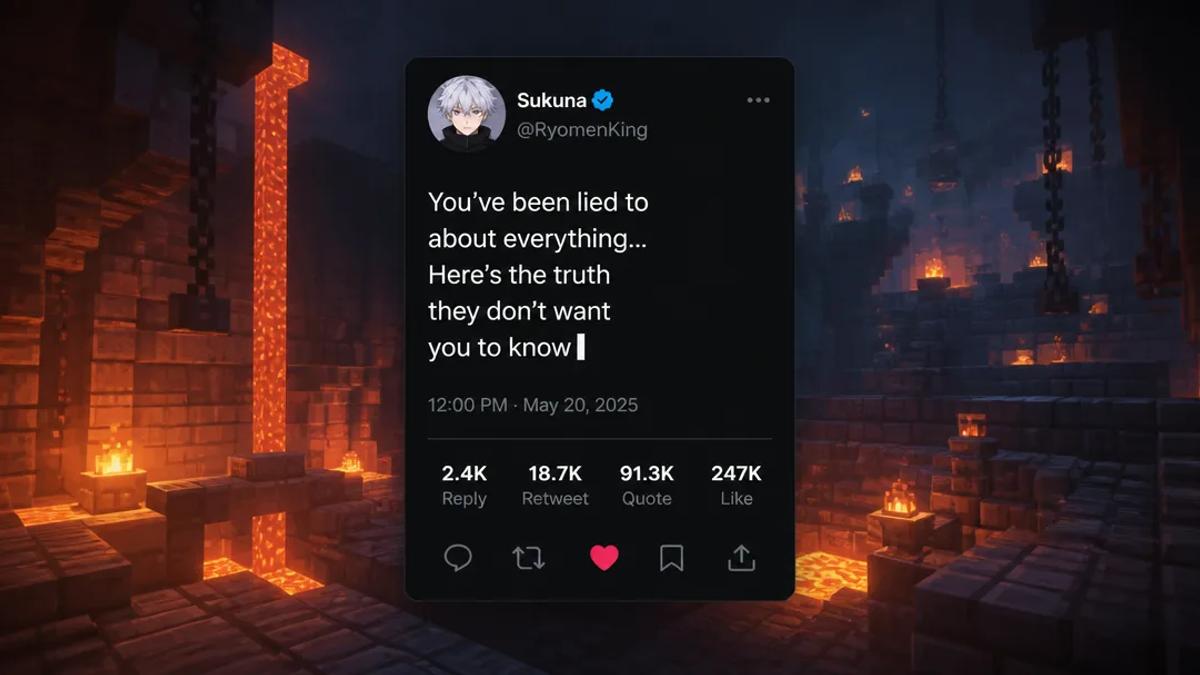
- Customize Visuals: Set the display name, @handle, avatar, verified badge, and engagement counts to mimic a real X post. Choose between light or dark X themes. Select a looping background visual, often gameplay footage, for engagement.
- Generate Narration: AI text-to-speech technology converts tweet text into a natural-sounding voiceover. Users can often choose from various voices and assign different voices to individual tweets in a thread.
- Add Enhancements: Automatically generate captions synchronized with narration, add background music, and sound effects to enhance video appeal.
- Render and Export: The AI combines all elements into a finished short-form video, ready for download or direct publishing.
This process eliminates the need for complex video editing software, voice actors, or manual captioning, making it accessible to creators without editing skills.
Step-by-Step: Creating Narrated Tweet Videos with Crealix AI
Crealix AI's Twitter Video Generator is designed for creators to quickly turn tweets or X threads into engaging, narrated short-form videos. The process is entirely AI-driven; no real Twitter/X account or API access is required as tweet cards are recreated in-app.
Here's how to create them:
- Access Generator: Navigate to the Twitter Videos creation tool within Crealix AI.
- Input Content:
- Single Tweet: Type or paste tweet text.
- X Thread: Write multiple tweets to form a thread. Use the AI thread writer to generate hypothetical-scenario threads from an idea.
- Customize Tweet Card Details:
- Enter display name, @handle, and upload an avatar image.
- Toggle the verified badge.
- Set engagement counts (likes, retweets, comments).
- Choose between light or dark X theme.
- Select Visuals: Pick a looping gameplay background video from the library. This visual element runs behind the tweet text as it's revealed.
- Choose Narration & Audio:
- Select an ElevenLabs voice for narration. Use one voice for the entire thread or a different voice for each tweet.
- Add optional background music and sound effects.
- Generate Captions: Crealix AI automatically generates word-by-word captions synchronized with narration.
- Review and Render: The AI processes inputs, generating narration, revealing tweet text in sync over the looping background, and adding all chosen audio elements. Once satisfied, render the final video.
This process prioritizes speed and volume, allowing creators to produce multiple narrated tweet videos daily without manual editing.
Best Practices for Viral Tweet Videos
To maximize the impact of your narrated tweet videos, consider these best practices:
- Choose Engaging Tweets: Select tweets or threads that are performing well, spark debate, offer insights, or tell a compelling story.
- Keep it Concise: Short-form video thrives on brevity. For long threads, consider breaking them into multiple videos or summarizing key points.
- Optimize for Sound-Off Viewing: Ensure visuals are engaging enough to capture attention even without sound.
- Use High-Quality Backgrounds: Looping gameplay or relevant stock footage enhances visual appeal. Crealix AI offers a selection of backgrounds.
- Experiment with Voices: Different AI voices convey different tones. Experiment to find one that suits your content and brand.
- Add a Call to Action: Encourage viewers to follow, like, or comment, as with any other short-form video.
Leveraging AI tools like Crealix AI enables content creators to efficiently transform viral tweets and X threads into dynamic, narrated short-form videos, expanding reach and engaging new audiences across social media platforms. Try the Twitter Video Generator today.