Create AI Movies with Consistent Characters & Scenes
Generate AI movies and short films with consistent characters and scene continuity using advanced AI video production tools.
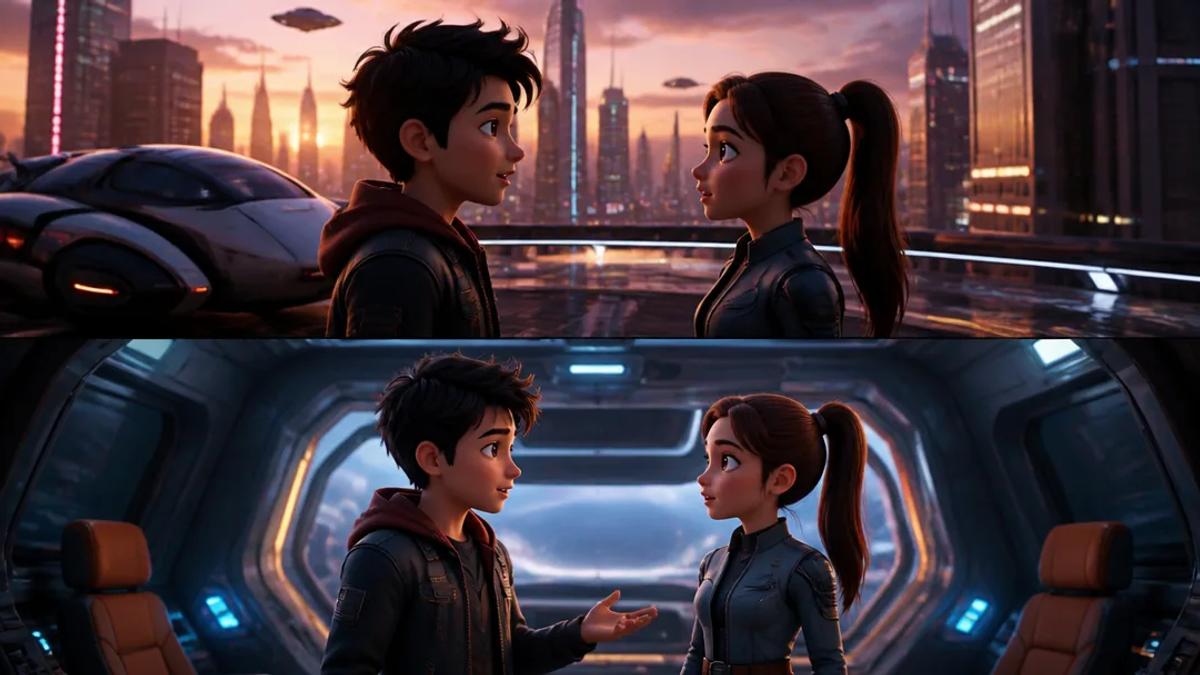
Creating AI movies with consistent characters and scene continuity is now achievable, enabling creators to produce cinematic short films without extensive manual editing. The key lies in leveraging advanced AI video generators designed to maintain visual and narrative coherence across multiple scenes.
Understanding AI Movie Generation for Short Films
AI movie generation uses artificial intelligence to produce video content from text prompts or ideas. For short-form content, this transforms a concept into a fully narrated and subtitled video, often with specific visual styles and character designs. Traditionally, the challenge has been maintaining consistency, especially for characters and environments, across a longer narrative or multiple scenes.
Modern AI tools address this by integrating features like character libraries, voice cloning, and scene-to-scene visual linking, enabling the creation of cohesive stories. This process significantly speeds up production, making it possible to generate high-quality short films for platforms like TikTok, Instagram Reels, and YouTube Shorts.
Achieving Consistent AI Characters in Your Movies
Maintaining a consistent look and voice for characters is crucial for any narrative. AI movie generators employ several techniques to ensure characters remain recognizable and true to their initial design throughout the film.
Using Character Libraries and Reference Images
Many AI movie platforms allow you to select characters from a predefined library or upload reference images. This ensures the character's appearance, including facial features, clothing, and overall style, remains consistent across different scenes and angles.
For example, Crealix AI's AI Movies generator and AI Skeleton generator utilize this approach. For AI Movies, leverage optional library characters. For AI Skeleton, pick a recurring skeleton character from a library or upload a reference image. The AI then generates scenes maintaining that character's consistency across every shot, from portrait to visual style.
Voice Cloning and Consistent Narration
Beyond visuals, character consistency extends to their voice. AI video tools often integrate voice cloning or allow assignment of specific ElevenLabs voices to individual characters. This ensures dialogue and narration maintain the same vocal characteristics, enhancing character identity and narrative flow.
In Crealix AI's AI Movies, native dialogue and lip-sync (MiniMax H3) ensure consistent voices. Similarly, for AI Skeleton videos, a single narrator voiceover is maintained throughout the escalating story.
Ensuring Scene Continuity in AI Short Films
Scene continuity refers to the seamless flow of visuals and actions between different shots and scenes. This is vital for a cinematic feel and to prevent jarring transitions that can disengage viewers.
Scene-to-Scene Visual Linking
Advanced AI movie generators link scenes visually. A new scene will often open on the last frame of the previous scene, or maintain elements like lighting, environment, and character placement to create a smooth transition. This mimics traditional filmmaking techniques without manual compositing.
Crealix AI's AI Movies feature is built with scene-to-scene continuity, ensuring each new scene opens on the previous scene's last frame, maintaining consistency in cast portraits and cloned voices.
Storyboarding and Visual Planning
While AI automates much of the visual generation, a well-structured narrative and storyboard still guide the process. AI movie generators often produce a multi-panel storyboard sheet per scene, allowing review and ensuring visual progression aligns with your story. This pre-visualization step helps maintain continuity and refine the narrative before final rendering.
For example, Crealix AI's AI Movies provide a multi-panel storyboard sheet per scene, offering a clear overview of visual progression.
Workflow for Generating Cinematic AI Videos
Creating an AI short film with consistent elements typically follows a streamlined process:
- Idea Generation: Start with a clear concept or script for your short film.
- Character & Style Selection: Choose recurring characters (from a library or by providing reference images) and define the visual style (e.g., cinematic, cartoon, anime).
- Script & Narration: Provide the script. The AI generates dialogue and narrations, assigning consistent voices to characters.
- Scene Generation: The AI generates visual scenes based on your script and chosen style, ensuring continuity between shots and maintaining character consistency.
- Review & Refine: Review the generated storyboard and scenes. Most platforms allow adjustments or regeneration of specific elements.
- Add Enhancements: Integrate background music, sound effects, and captions to complete the cinematic experience.
- Render & Publish: The AI renders the final video, ready for download or direct publishing.
With tools like Crealix AI, this entire process is prompt-driven. Describe an idea or paste a script, and the platform handles script generation (if needed), voiceover, visuals, captions, and rendering, prioritizing consistency. Explore creating your own cinematic AI short film by trying the AI Movies generator.
Scaling AI Movie Production with Autopilot
For creators aiming for high-volume content, maintaining consistency across a series of AI movies can be challenging. This is where features like Autopilot come into play.
Autopilot allows you to set up recurring video series where the AI plans ideas, produces episodes, and publishes them automatically. When creating an automated series, define the format (including AI Movies), a creative brief, and variety pools for elements like voices, background music, caption styles, and visual styles. This ensures that while each episode is unique, it adheres to a consistent brand and quality standard.
Leveraging Autopilot, creators can run a faceless channel or produce regular short films without daily manual intervention, knowing that character and scene consistency will be maintained according to defined parameters. Learn more about setting up an automated series with Autopilot.
Ready to start creating your own cinematic AI short films with consistent characters and scenes? Try Crealix AI for free today.